Patient data is protected on every account.
G3 Flow handles protected health information under a business associate agreement. The safeguards on this page are on for every organization, from its very first account; none of them are add-ons.
Signing in
A password alone never opens G3 Flow.
Two-step verification, always
After the password, every account enters a code from an authenticator app. Setup takes about a minute with a QR code, and ten single-use recovery codes cover a lost phone.
Passwords done properly
At least 12 characters, stored only as PBKDF2-SHA256 hashes with 600,000 iterations and a salt for each password. Five wrong attempts lock the account for 15 minutes.
Sessions that end
Sessions are HttpOnly cookies whose tokens are stored only as hashes. They end after 15 minutes without activity and after 12 hours in any case; background refreshes don’t keep a session alive.
Single sign-on
OpenID Connect with Microsoft Entra ID, Okta, Google or any OIDC provider, using PKCE, a nonce and signed-token checks. A sign-on counts as two-step only when your provider says it used more than one factor.
SCIM provisioning
SCIM 2.0 lets your identity provider add, change and remove people automatically. Removing someone ends their sessions at once.
Invitations, not open doors
After the first account, people join only by an invitation link that works once and expires in 72 hours. New organizations confirm their email and accept the business associate agreement before anyone signs in.
Who sees what
Each person sees the work they do, and nothing more.
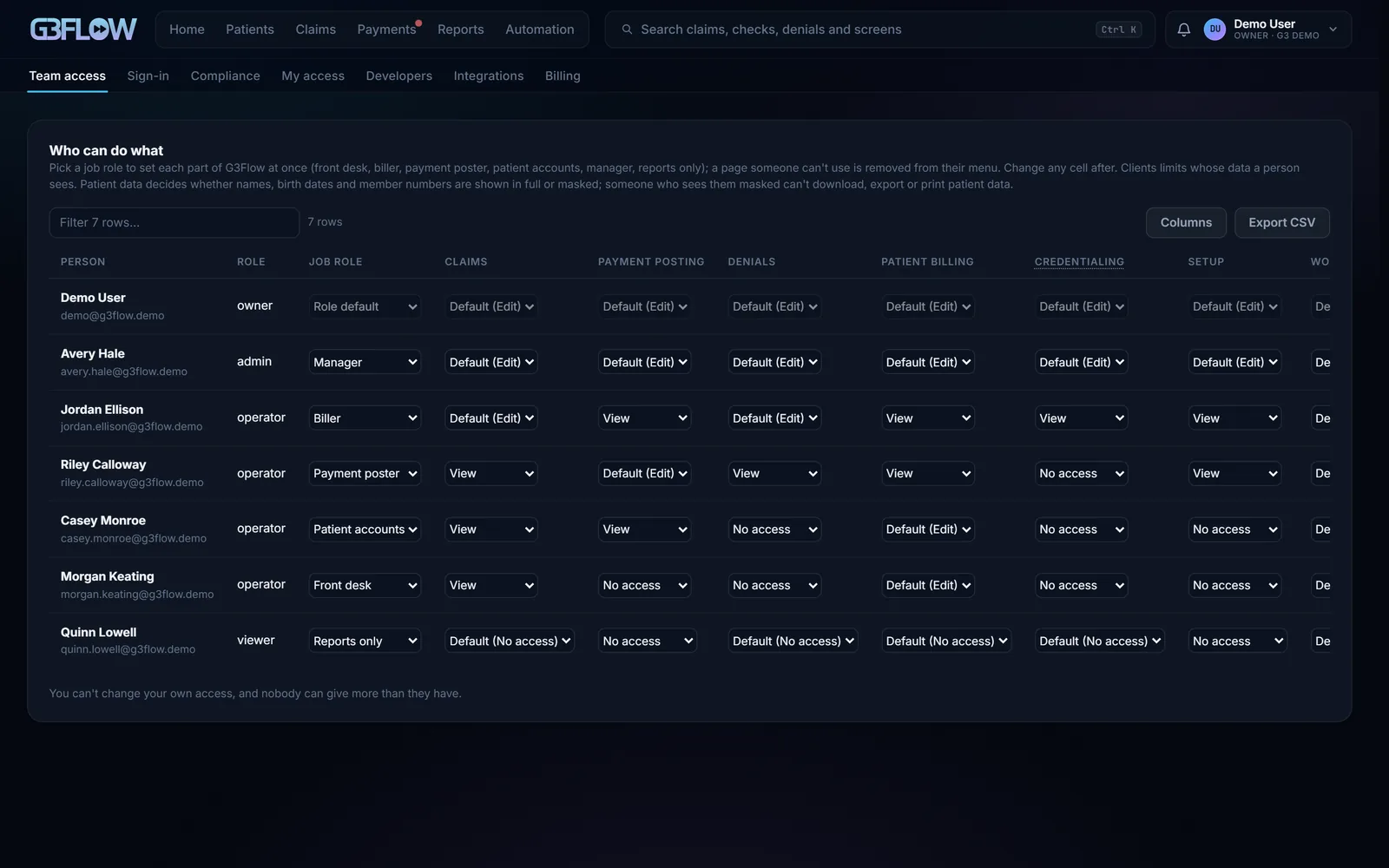
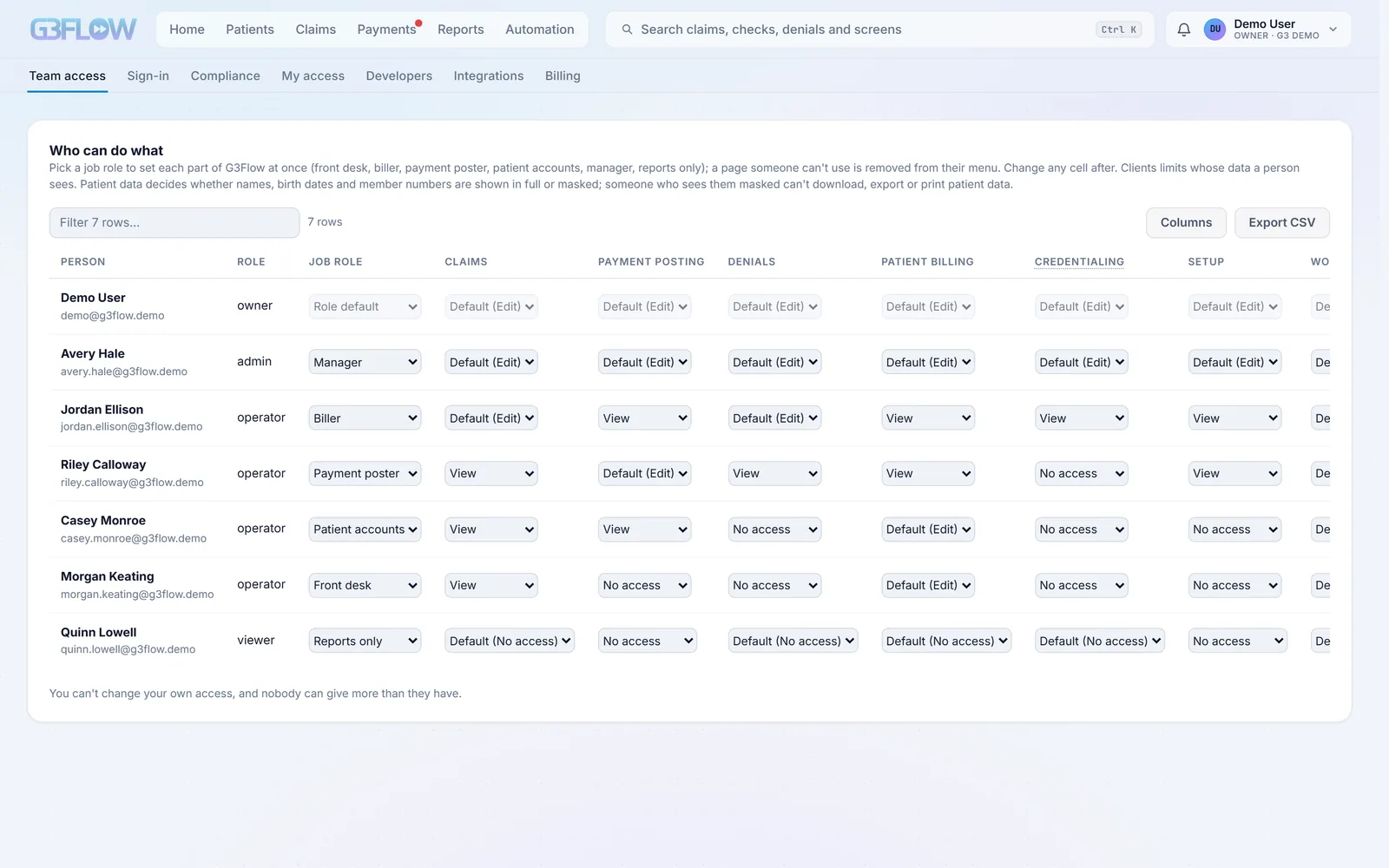
Roles by job
Front desk, biller, payment poster, patient accounts, manager or reports only, each with its own read and write access to every part of G3 Flow. Pages someone can’t use aren’t shown at all.
Limited to their clients
A person can be limited to some clients. Their lists, searches, reports and exports then show only those clients’ data, and so do API clients.
Masked patient data
Anyone can be set to see patient data masked: initials instead of names, the year instead of a birth date, the last four characters of an ID. Masked accounts can’t export, download or print patient data.
Temporary full access, on the record
When a masked person needs more, they can ask for full access to one client for 30 minutes with a reason. It is logged, alerted and reviewed by an admin.
Exports that ask again
Exporting patient detail needs a fresh two-step code, good for five minutes, and every export is recorded.
Every route has a rule
Every address in G3 Flow has an explicit access rule, and one without a rule is refused. Requests that change data from another site are refused too.
Protecting the data
Encrypted where it’s stored, and kept out of places it doesn’t belong.
Encrypted at rest
Patient data is encrypted with AES-256-GCM, using separate keys derived for each kind of data. Deleted records are overwritten on disk, not just unlinked.
Credentials in a vault
Passwords and keys for your clearinghouse, billing system and other connections are encrypted on disk, with AWS KMS available for the key.
Logs without patient data
The application log never holds names, birth dates or member IDs. The audit trail that does is encrypted.
Safe in the browser
HTTPS with TLS 1.2 or later in production, HSTS, a strict content security policy, no framing by other sites, and no referrer sent elsewhere.
Messages that carry links, not details
Emails and texts to patients and staff carry a link, never patient details. Card numbers never touch G3 Flow; online payments run on Stripe.
Webhooks that can’t be spoofed
Events sent to your systems are signed with HMAC-SHA256, go only to public HTTPS addresses, and leave patient details out.
Oversight and audit
A record you can hand to a compliance officer.
Every view of patient data, logged
Each view, list, search, export, print and download of patient data is recorded with who and when. The patient and claim identifiers are stored as keyed hashes, and the log is kept for six years.
Feed it to your SIEM
Security tools can pull the access log as JSON Lines with a token, hashes only.
Sign-in history
Sign-ins, failed attempts, lockouts, two-step resets and invitations, kept for six years.
Quarterly access reviews
Each quarter, every account is listed with what it can reach, and an admin signs off. Accounts unused for 90 days, without two-step or with extra privileges are flagged.
The agreement on file
Business associate agreements are versioned, and each acceptance records the exact text accepted, by its SHA-256 fingerprint, with who signed and their title.
A register of subprocessors
Every vendor that may handle data is listed with its purpose, location, whether a BAA is on file and when it was last reviewed.
Safe automation
Software does the routine work; a person decides anything that changes a live system.
Dry run first
Stages that write to an outside system start in dry run, recording what they would do, until a person turns them live.
Shown before it’s sent
Posting payments, sending claims or changing a record lists the items, the count and the total, and waits for a person to confirm.
Changes to the LIS, approved
Corrections to a lab system are proposed with their evidence, checked against the right record, and written only after a person approves them, field by field.
Two admins for new automations
A rule or automation built in Automation Studio is tested on past data and approved by a different admin before it runs, and it can be rolled back in one click.
Stops when a login breaks
A rejected credential, or three failed logins in a row, stops that integration until a person resets it.
Incidents, in the open
Failing stages and alerts open incidents on their own, with a public status page and 90-day uptime when you turn it on.
AI and patient data
AI helps with drafting. It never decides, and it never sees more than it needs.
Off until you opt in
AI features such as appeal drafts, service desk replies and the automation assistant run only for organizations that turn them on.
Identifiers removed first
Names, birth dates, member IDs, record numbers, phone numbers, addresses and claim numbers are replaced with placeholders before a model sees the text, and put back only for the person reading it.
Under a BAA, or not at all
Anything that involves patient data goes through AWS Bedrock under its business associate agreement. Without it, those features stay off rather than fall back to another service.
Rules, not guesses
Eligibility classification, payer routing, claim edits and posting rules are deterministic. AI drafts text for a person to review; it never changes a claim, a payment or a record.
Retention and backups
Kept as long as it should be, and recoverable when it matters.
Encrypted, verified backups
Snapshots are integrity-checked, encrypted in AES-256-GCM chunks, and kept as 14 daily and 12 monthly copies, with a second copy offsite when you set one up.
Retention by kind of record
Operational data expires on a schedule; access and sign-in history stay for six years; financial records are never purged.
Where we are, plainly
We’d rather tell you what’s here than imply what isn’t. G3 Flow supports single sign-on through OpenID Connect, not SAML. Our controls are mapped to SOC 2 criteria inside the product, and we’ll walk through them with you; we don’t claim a certification we haven’t earned.
Questions from your compliance team?
We’ll go through the access log, the BAA and the controls with them, on your data.